PeekShot
Screenshot automation for teams. Schedule, bulk capture, and get clean hosted screenshots at scale.


Automate clean, high-quality website screenshots without lifting a finger. PeekShot captures pixel-perfect screenshots for you, hosts them securely, and gives you shareable URLs that you can use anywhere.
With PeekShot you can:
- Generate full-page, retina-quality screenshots from any URL via API or dashboard
- Run captures on demand or schedule recurring jobs to build a visual history
- Process hundreds or thousands of pages at once with bulk screenshot workflows
- Get hosted image URLs that are easy to embed, share, or include in reports
- Connect via REST API, use webhooks, or automate with Make and Zapier
- Send captured images to cloud storage like Amazon S3 for long-term access
PeekShot is built for real work, not just quick snapshots. It fits into SEO reporting, competitive monitoring, QA visual checks, internal dashboards, and any workflow that needs reliable visual documentation on demand.
Say goodbye to manual screenshot workflows and meet PeekShot, your automated screenshot engine..
TL;DR

At-a-glance
Best for
Overview
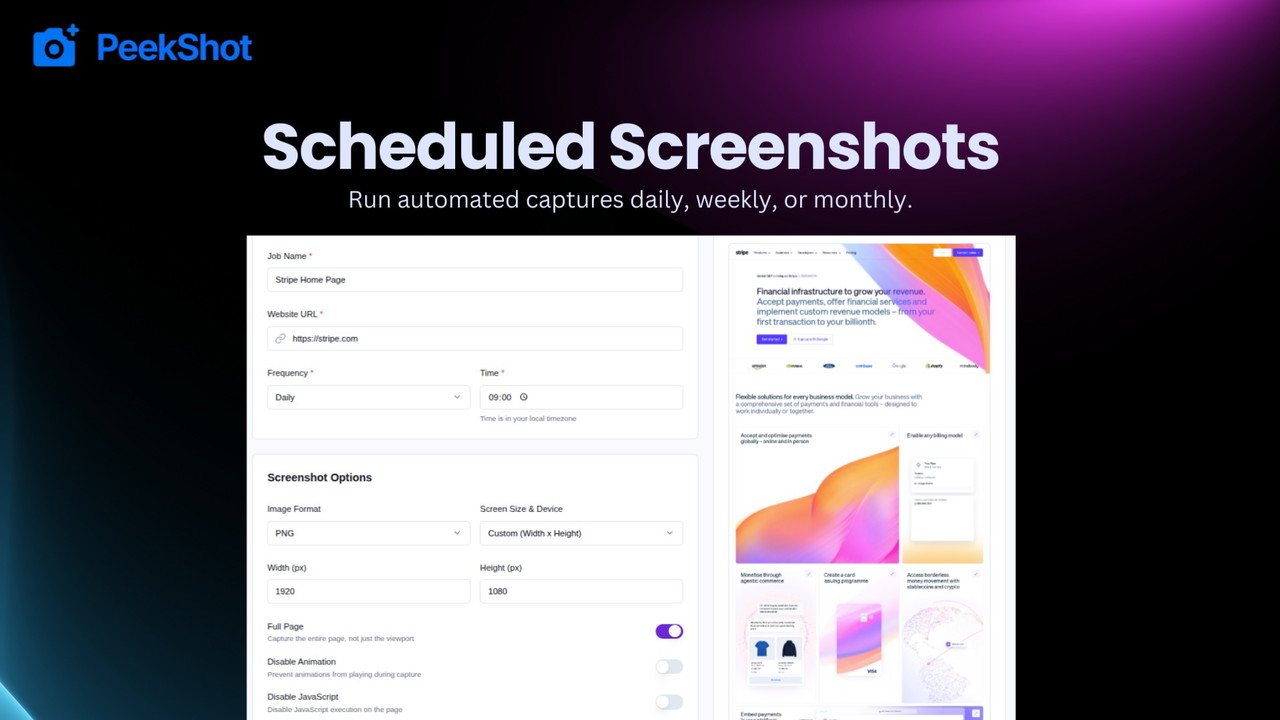
Scheduled and Automated Screenshots
PeekShot lets you schedule recurring screenshot captures for any URL, so you can automatically track visual changes over time without manual work.
Rather than taking single screenshots one off by hand, you can set up scheduled jobs that run in the background — daily, weekly, or at whatever frequency you choose. Once configured, PeekShot will:
- Fetch the fully rendered page at each scheduled time
- Strip away popups or cookie banners for consistent visuals
- Save the screenshots and host them with reliable URLs
- Keep a history of captures so you can compare past and present versions
This feature is especially helpful if you need to:
- Monitor competitor websites and notice layout or content changes
- Track search engine results page (SERP) appearances over time
- Document site updates for clients, audits, or stakeholders
- Catch visual regressions in QA without constantly re-checking manually
Scheduled screenshot automation frees you from tedious manual tasks and gives you always-ready visual proof on demand.
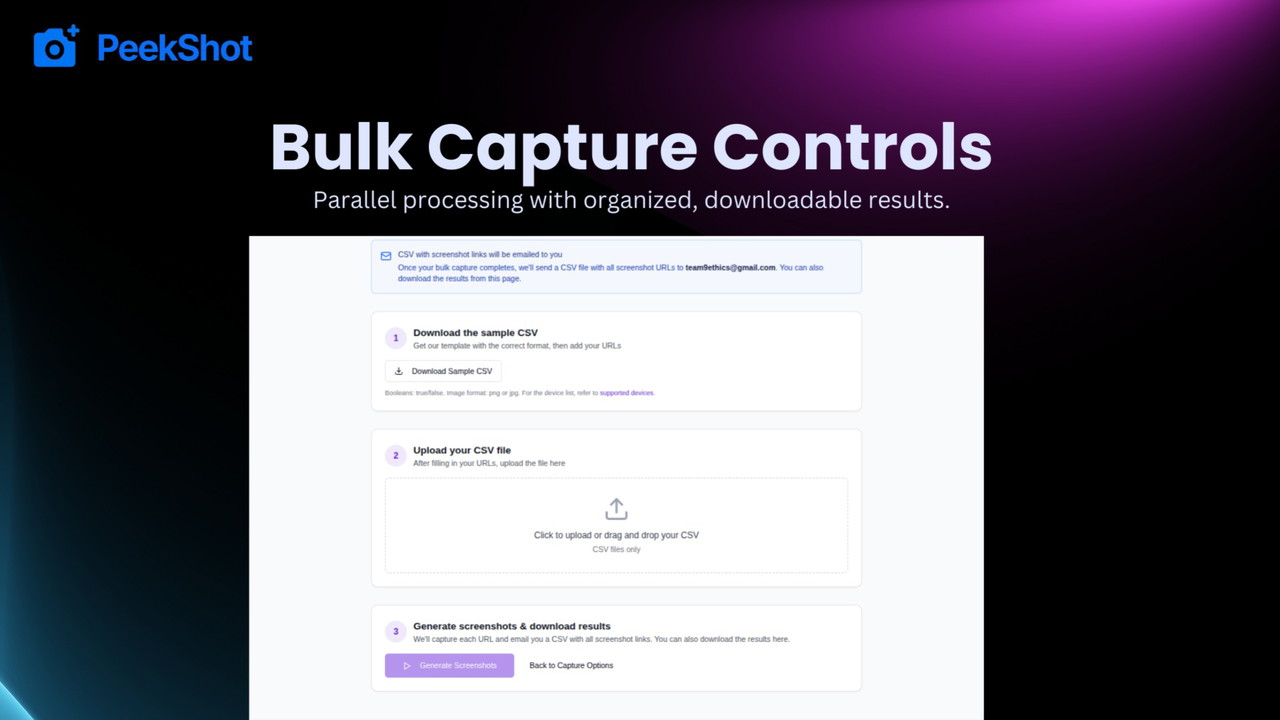
Bulk Screenshots for Scaled Visual Capture
Bulk Screenshots is one of PeekShot’s most powerful features. Instead of capturing pages one by one, you can upload a list of URLs and process them all in a single automated job. PeekShot will queue the entire list, fetch each page, render it fully, and deliver clean screenshots for every URL you provided.
This feature is especially helpful when you need to collect visuals at scale, such as:
- Auditing entire sections of a website
- Generating screenshots for hundreds of landing pages
- Monitoring client portfolios in SEO or digital marketing
- Creating visual references for documentation, training, or dashboards
Benefits include:
- Save hours of repetitive work
- Maintain consistency across large sets of screenshots
- Download or push all visuals to cloud storage like Amazon S3
- Integrate the results into your reporting or automated workflows
With bulk processing, you no longer waste time manually triggering individual captures. PeekShot manages the workload in the background, processes pages asynchronously, and gives you hosted image URLs you can embed or share anywhere.
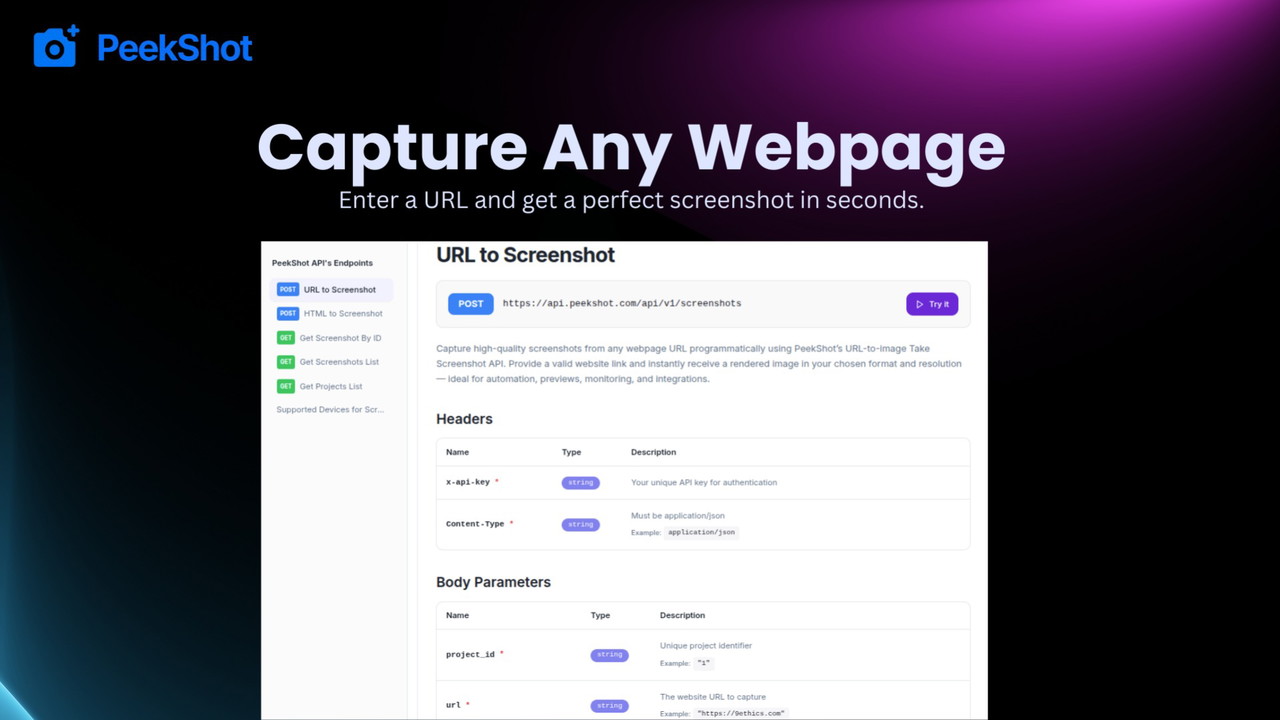
REST API and Webhooks for Seamless Automation
PeekShot’s REST API and Webhooks make screenshots a programmable part of your workflow.
With the API you can trigger captures from anywhere — code, dashboards, internal tools, automation platforms, or custom apps. Just send a request with the URL to capture and PeekShot handles rendering and delivery.
Webhooks notify your system when a screenshot is ready. Instead of checking manually, your tools can receive the result and take action automatically.
How this helps:
- Integrate screenshot capture into your own apps and tools
- Automate end-to-end workflows without manual steps
- Process results automatically with webhook callbacks
- Scale from single captures to hundreds of jobs efficiently
- Connect with automation platforms like Make, Zapier, or custom systems
- Build features that depend on visual page data
PeekShot’s API and webhooks turn screenshot capture from a one-off task into a reliable, automated part of your stack.
Custom Capture Options for Precise Results
PeekShot gives you control over how screenshots are captured so you can get exactly the visuals you need. Instead of generic, one-size-fits-all screenshots, you can customize how each page is rendered, what elements are shown or hidden, and how the final image looks.
With custom capture options you can:
- Adjust viewport size to match desktop, tablet, or mobile layouts
- Inject custom CSS or JavaScript to hide banners, cookie popups, or unwanted elements
- Set delays to wait for dynamic content to load before the screenshot is taken
- Choose full page or specific viewport captures based on your needs
- Configure format settings like PNG, JPG.
How this helps:
- Get cleaner, more consistent screenshots without distractions
- Remove cookie banners, overlays, or popups that otherwise block content
- Match screenshots to client or reporting requirements
- Capture exactly what matters, not just a default render
- Improve visual quality for presentations, audits, QA reports, or comparisons
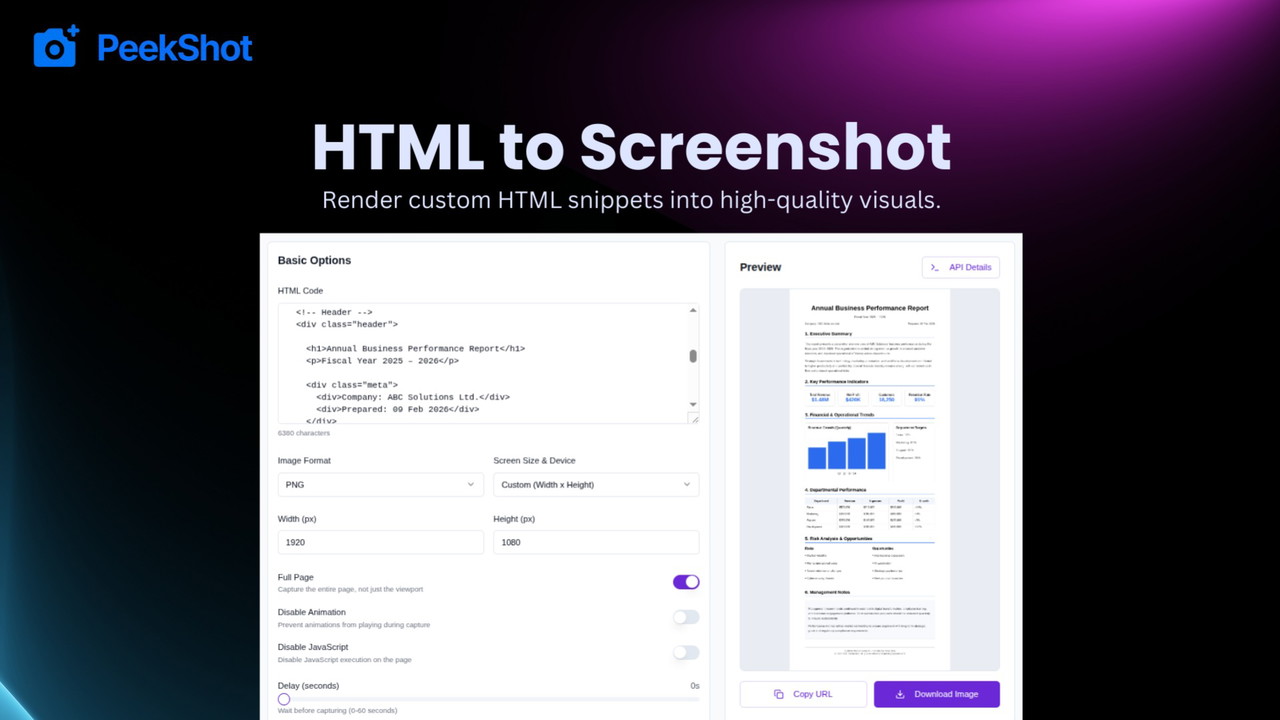
HTML-to-Screenshot for Custom Visual Outputs
PeekShot’s HTML-to-Screenshot feature lets you convert HTML code directly into a rendered screenshot. Instead of capturing a live URL, you can provide raw HTML, inject it into the renderer, and PeekShot will output a clean image based on exactly what you define.
This gives you total control over the visual content without depending on a hosted web page. You can use HTML from templates, internal apps, design systems, or dynamic content and turn it into a consistent visual representation automatically.
How this helps:
- Generate visuals from templates: Convert UI mocks, email templates, or design previews into images without publishing them online
- Standardize output: Create consistent branding or reporting visuals from structured HTML input
- Test dynamic content: See how generated HTML looks when rendered, without needing a live staging site
- Automate internal workflows: Use API to drive snapshot creation from engines that produce HTML on the fly
- Embed anywhere: Output image URLs can be embedded in dashboards, reports, or client presentations
Plans & features
Deal terms & conditions
- Lifetime access to PeekShot
- You must redeem your code(s) within 60 days of purchase
- All future Basic (Plan 1) or Advanced (Plans 2+) Plan updates
- Stack up to 3 codes

60 day money-back guarantee. Try it out for 2 months to make sure it's right for you!
Features included in all plans
- Custom viewpoints
- Full page screenshots
- High resolution Images
- Unlimited projects